
Basic electrical circuits. Essential elements
Online simulations of basic electrical circuits on this page serve as an introduction to our collection of thematic units on electric circuits. You’ll discover some of the main components—like batteries and switches—as well as key concepts such as open and closed circuits or short circuits.
This Thematic Unit is part of our Circuits collection

STEM OnLine mini dictionary
Circuit Diagram
Graphical representation of a circuit using standardized symbols for each component and its connections.
Conductor
Material that easily allows the flow of electrons or heat due to its atomic structure.
Electric Circuit
Set of connected components allowing the flow of electric current.
Electric Load
Any circuit component (lamps, motors) that consumes electrical energy to perform work.
Power Supply
Device supplying electrical energy required for the operation of a circuit.
Switch
Control device that allows opening or closing the path of the electric current at a point in the circuit.
What is a basic electric circuit?
The basic electric circuits introduced in this first Thematic Unit consist of just four elements: a DC power source (battery), a light bulb, wires, and a switch. The interactions are intentionally limited to two actions: opening or closing the circuit with the switch, and adjusting the battery voltage.
Battery
The battery provides the energy needed for electric current to flow through the circuit. In these simulations, it acts as a direct current (DC) power source, meaning it pushes electrons in a single, constant direction. You can adjust its voltage to see how it affects the behavior of the other components. It’s the starting point of the electric flow and lets you safely experiment with different voltage levels.
Light bulb
The light bulb acts as a visual indicator of current flow: if it lights up, the circuit is closed and current is flowing; if it stays off, something is blocking the flow. In these simulations, the bulb’s brightness changes with the current intensity, allowing you to intuitively observe how the electrical effect varies depending on the circuit configuration.
Wires
Wires connect the different components and allow current to flow between them. Although they have no resistance in the simulation, their layout is key to closing the circuit or creating situations like short circuits. Manipulating the wires is the most direct way to build, modify, or interrupt the current path.
Switch
The switch lets you open or close the circuit easily. In the simulations, just click on it to change its state. It’s the ideal component to introduce the concept of open and closed circuits, and to observe how a simple break can completely stop the current flow.

STEM OnLine mini dictionary
Circuit Diagram
Graphical representation of a circuit using standardized symbols for each component and its connections.
Conductor
Material that easily allows the flow of electrons or heat due to its atomic structure.
Electric Circuit
Set of connected components allowing the flow of electric current.
Electric Load
Any circuit component (lamps, motors) that consumes electrical energy to perform work.
Power Supply
Device supplying electrical energy required for the operation of a circuit.
Switch
Control device that allows opening or closing the path of the electric current at a point in the circuit.
Explore the exciting STEM world with our free, online, simulations and accompanying companion courses! With them you’ll be able to experience and learn hands-on. Take this opportunity to immerse yourself in virtual experiences while advancing your education – awaken your scientific curiosity and discover all that the STEM world has to offer!
Basic Circuit Simulations
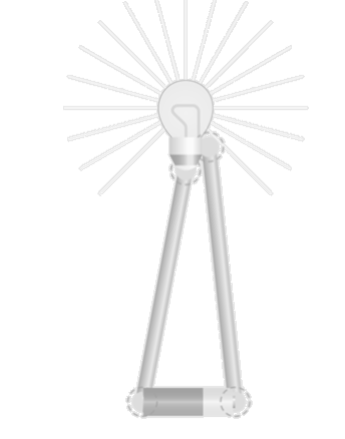
Simple circuit with a battery and a bulb
This simulation lets you build the simplest possible circuit: a battery connected to a bulb with two wires. If the circuit is closed, the bulb lights up. If any connection is missing, nothing happens. Try connecting the wires in order and see when the bulb turns on; disconnect one wire and see what changes; or adjust the battery voltage and observe how the bulb’s brightness varies. This simulation is ideal for confirming that current only flows in a closed circuit and that the battery is the source driving that flow.
Circuit with a switch
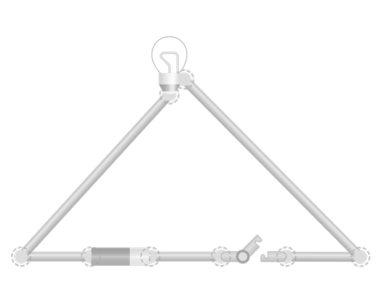
This simulation adds a switch to the basic circuit. Now you can open or close the circuit without disconnecting any wires. When the switch is closed, current flows and the bulb lights up. If you open it, the circuit breaks and the bulb goes out. Try toggling the switch and observing the immediate effect on the bulb, change the battery voltage and see if brightness varies when the switch is closed, or leave the circuit open and confirm that no current flows even if everything is connected. This simulation is great for introducing the concept of open and closed circuits in a visual and controlled way.
Circuit with a short circuit
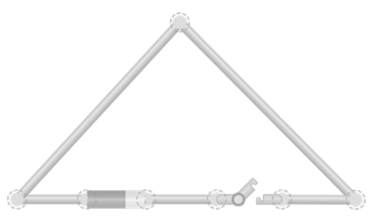
In this simulation, you can create a short circuit by connecting the two ends of the battery directly with a wire, without any component in between. When you do this, current flows through a very low-resistance path and the battery overheats to the point of catching fire—visually showing the danger of a short circuit. Try closing the switch and see what happens, change the battery voltage to check if the effect intensifies, or open the switch to interrupt the current. This simulation lets you safely observe what happens when a circuit is closed but no load is connected.
Circuit with two bulbs
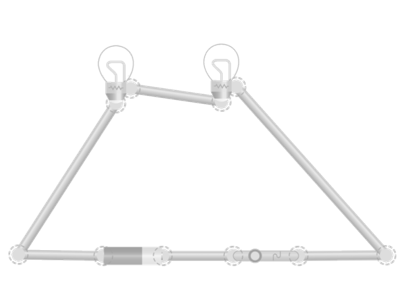
This simulation lets you connect two bulbs in series, one after the other, within the same circuit. When you close the switch, current flows through both bulbs before returning to the battery. You’ll see that both light up, but with less brightness than when there’s only one. If you disconnect either bulb, the circuit breaks and both go out. This simulation is useful for exploring how components behave when they share the current along a single path.
Giants of science
“If I have seen further, it is by standing on the shoulders of giants”
Isaac Newton
James Clerk Maxwell
–
André-Marie Ampère
–
Become a giant
Principles of Modeling, Simulations, and Control for Electric Energy Systems
Principles of Electric Circuits | 电路原理
Electrotechnique I
Electromagnetic Compatibility Essentials
Professional development for Educators
Teach computing: Moving from Scratch to Python
Teach computing: Support SEND learners with computing
Teach teens computing: How computers work
STEM Outside
Giants of science
“If I have seen further, it is by standing on the shoulders of giants”
Isaac Newton
André-Marie Ampère
–
Michael Faraday
–
Become a giant
Principles of Modeling, Simulations, and Control for Electric Energy Systems
Principles of Electric Circuits | 电路原理
Electrotechnique I
Electromagnetic Compatibility Essentials
Professional development for Educators
An Introduction to Evidence-Based Undergraduate STEM Teaching
Reimagining higher education teaching in the age of AI
Chatbots for Instruction
Learning How to Learn: Unlocking a Growth Mindset with AI
Test your knowledge
What is a basic electric circuit, and why does it form the foundation of all more complex electrical systems?
How do the main components of a basic circuit—power source, conductors, load, and switch—interact, and what role does each one play in the system’s operation?
Why does the current stop flowing when I open the switch? Does it really make sense that “just a tiny gap” stops everything?
What happens if I connect the wires incorrectly in a basic circuit? How come the components don’t work even if they’re not damaged?
How come a simple battery can light a bulb? Shouldn’t it need “more energy” to do that?
You may also be interested
Last simulations
To learn and experience
Take your knowledge to the next level with science kits and hands-on tools that connect theory with experimentation
Relativity and Quantum Physics For Beginners

Teachers essentials
Notion
Organize your notes, tasks, and projects in one place. Notion combines notes, lists, and calendars in one flexible space.
Canva
Design presentations, diagrams, and infographics with easy-to-use templates and professional results
Genially
Create interactive content, presentations, and educational games in a simple and visual way
Desmos
The most intuitive graphing calculator to explore mathematics and create dynamic classroom activities
Tinkercad
Design in 3D and simulate electronic circuits for free; it’s the perfect tool for simple robotics projects
Your Infinite Library
Enjoy the freedom to explore millions of titles and a curated selection of magazines on any device
Join Prime for students and young adults
The best series. Millions of songs. All included with your subscription.
Science made fun
Learn with the best courses
edX
Online courses from leading universities and companies. Learn practical skills and earn professional certifications
Coursera
Courses from leading universities and companies. Learn practical skills and earn professional certifications
Udemy
Thousands of online courses tailored to your level. Learn at your own pace with expert instructors